
Stop chasing approvals. See where each document waits
Submit a project document once, see which approver holds it and for how long, and let reminders do the chasing. Documents sit next to the tasks they belong to.
Included in the free trial · Cloud: $3 per concurrent user a month on Pro and up · Self-Hosted: $499 a year per company
CloudSelf-HostedOpen Source
| Reader | Project manager who runs projects and chases approvals |
|---|---|
| You do | Upload, link, submit |
| The system does | Routing in order, reminders, the record |
| Runs in | Cloud and Self-Hosted |
Why approvals eat a project manager's week
| Problem today | With Orangescrum |
|---|---|
| You ask reviewers one by one, in several channels. Every approval becomes a round of messages. | Submit once. The document goes to each approval level in order. |
| You cannot tell who holds the document. Status meetings start with 'has anyone seen it?'. | The approval shows the level it is at, and the ageing report shows how long it has waited. |
| Reminders are manual. Chasing is a job nobody wrote down, so it falls to you. | A reminder chases the approver, then a final overdue notice is sent. |
| Documents and tasks live in different places. The task says 'done' while the document behind it is still in review. | Open the document from its task, and the task from the document. |
| Review comments get lost. Feedback arrives in email, chat and the margin of a PDF. | Comments with @mentions stay on the document. |
From upload to approved
What you do, and what the system does for you. If an approver is away, delegation covers the absence.
01
Upload and link
Add the document to the project folder and link it to its task.
Features: Nested folders, Links to tasks
03
Watch and nudge
See the level the document is at. A reminder chases a late approver, then a final overdue notice can escalate.
Features: Ageing report and reminders
04
Close it out
When it is approved, share the version and keep the record.
Features: Per-document sharing and audit log
What a project manager uses
Approval templates
Save a chain once and pick it when you submit, instead of naming the same people every time.
Links to tasks
Open the document from its task, and the task from the document.
Ageing report
See how long each document has spent at each approval stage.
Reminders and delegation
A reminder chases the approver, then a final overdue notice is sent. Delegate an approval when someone is away.
Comments with mentions
Discuss changes on the document itself, and mention the person who must act.
Version history and comparison
Every upload creates a version with its own change note. Compare any two versions line by line.
Product screens from a demo project
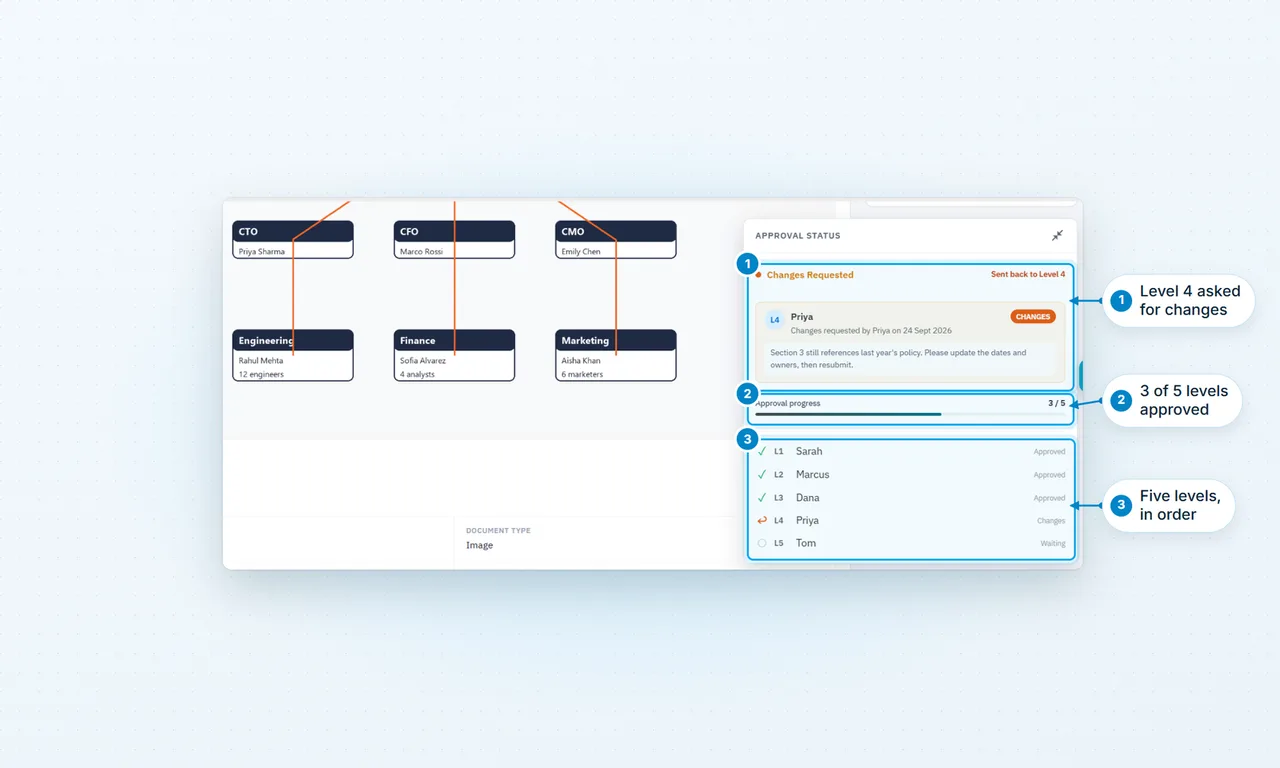
Approval chain
Each level in order, who acted, and where a change request sent the document.
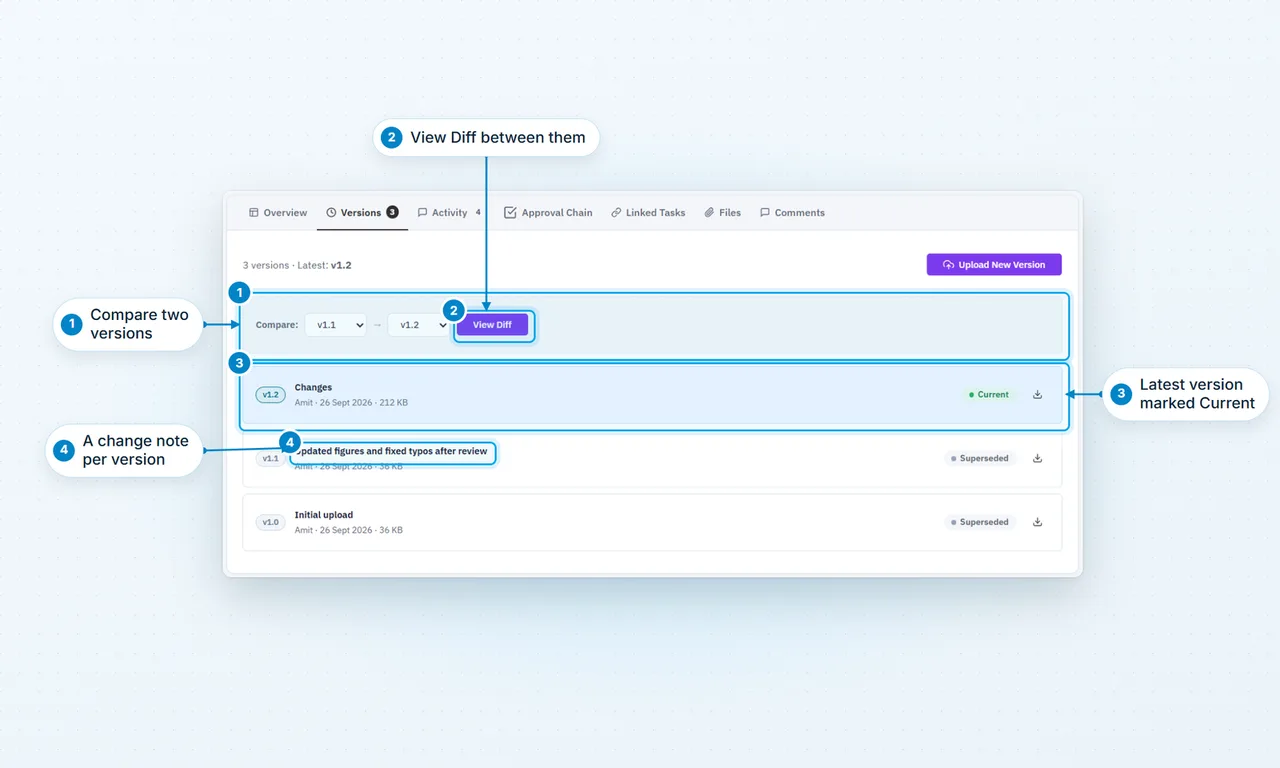
Version history
A change note on every version, and a line-by-line comparison of any two.
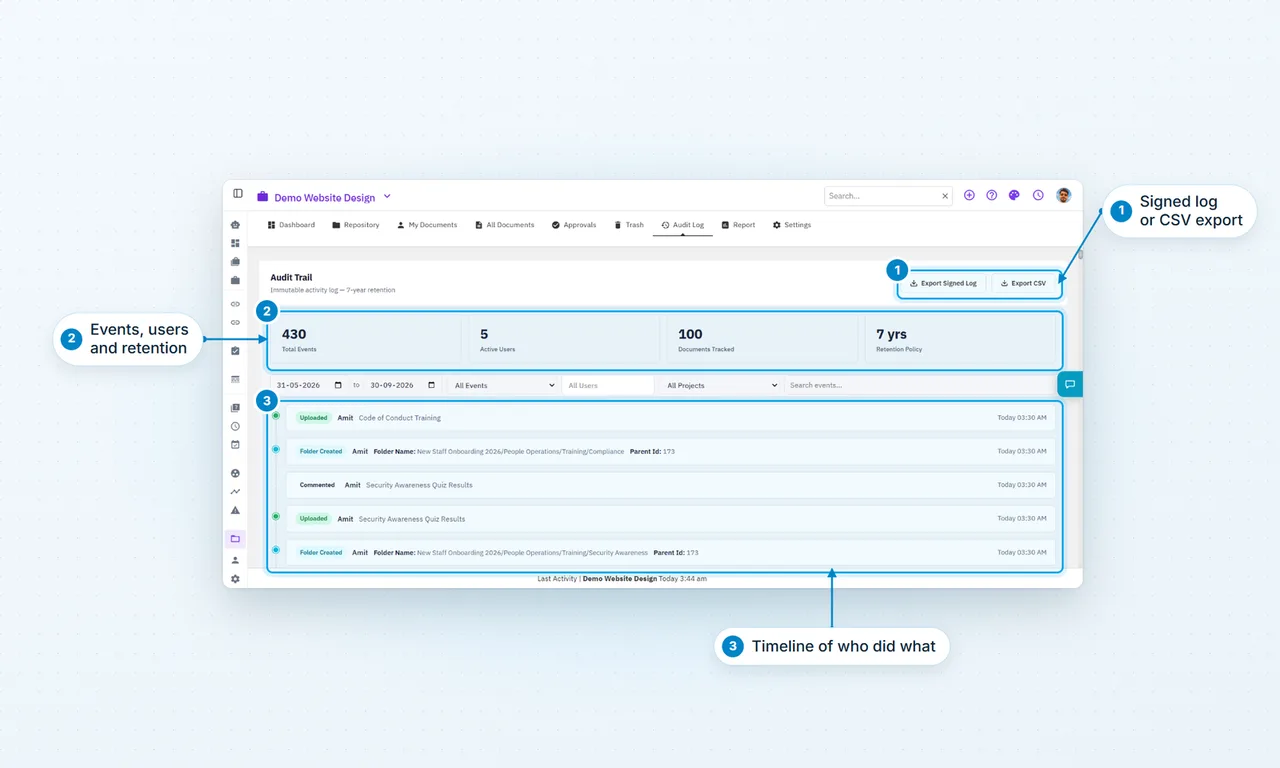
Audit log
Who did what and when, exported as CSV or a signed log.
For project managers, answered
How do I send a document to several people?
Submit it with an approval template. Levels run in order, and a level can name several people or a role, where any one of them can approve.
Can I see how long it has waited?
Yes. The approval shows the level it is at, and the ageing report shows time at each approval stage.
Can I link a document to a task?
Yes. Open the document from its task, and the task from the document.
What if an approver is away?
Delegate the approval to someone else. A reminder chases a late approver, then a final overdue notice can go to the next approver or the document owner.
What happens when a reviewer asks for changes?
The document comes back for an update. When you resubmit, approval resumes where it stopped, or from the earlier level the reviewer picked.
Is it included in the free trial?
Yes. Document Management is included in the 14-day free trial. After the trial it is an add-on: $3 per concurrent user a month in Cloud, on Pro Unlimited, Premium or Enterprise, or $499 a year per company in Self-Hosted.
Spend less of the week chasing approvals
Document Management is included in the free trial. Cloud: $3 per concurrent user a month on Pro and up. Self-Hosted: $499 a year per company.
Included in the free trial · Cloud: $3 per concurrent user a month on Pro and up · Self-Hosted: $499 a year per company
Keep reading
Document Management
The full feature: repository, versions, approvals, ageing report and audit log.
In-house PMOs
One approval route for every project document.
Reviewers and approvers
Review a document, decide and move on.
Approval workflow software
Ordered approval levels with a record of every decision.