
Approval workflow software built into your projects
Route documents through ordered levels of approvers, see where each one waits, and keep a record of every decision. Part of Orangescrum, next to your tasks.
Included in the free trial · Cloud: $3 per concurrent user a month · Self-Hosted: $499 a year per company
CloudSelf-HostedOpen Source
What is an approval workflow for documents?
An approval workflow is the defined route a document follows to be approved: who reviews it, in what order, what happens when someone asks for changes, and a record of each decision. In Orangescrum the route is a chain of levels saved as a template, and each document carries its own approval history.
What an approval workflow has to do
| Problem today | With Orangescrum |
|---|---|
| The order gets lost Approvers are chosen by email and nobody knows who is next. | Ordered levels. Each level approves before the next one starts. |
| Routes break when people move An approver changes role and the route stops working. | Name a level by role, or by several people where any one of them can approve. |
| A change request restarts everything One reviewer wants an edit and the whole chain starts again. | The reviewer sends it back to the author or an earlier level, and approval resumes from there. |
| Late approvals go unnoticed A document sits in someone's queue for a week. | A reminder, a final overdue notice, delegation, and the ageing report. |
| Nobody can show the decision trail The auditor asks who approved the version in force. | The audit log records approvals, rejections and delegations with the user and time. |
| Approvals live apart from the work The document is approved in one tool and the task tracked in another. | The document links both ways to its task, in the same product. |
Everything a document approval chain needs
Ordered multi-level chains
Each level must approve before the next one starts. A chain can have as many levels as you need.
A person, several people, or a role
Name a role or several people so the route survives staff changes. Any one of them can approve the level.
Change requests that resume
The reviewer sends the document back to its author or to an earlier level. On resubmission, approval picks up from there and earlier approvals carry forward.
A reminder, then a final notice
Approvers get a reminder, then a final overdue notice that can go to the next approver or the document owner.
Delegation
Hand an approval to someone else when you are away, up to three times, with the original approver kept on record.
Automatic approval after set days
A template can approve a level automatically after a set number of days. Use it for low-risk documents only.
Reusable approval templates
Save a chain once and pick it when you submit, instead of choosing approvers every time.
Bulk approval
Approve or reject a queue of documents from the Approvals page.
How a document moves through the chain
Every step is recorded, so you can show who did what and when.
01
Submit
Upload the document and submit it with the approval template for its type.
02
Review in order
Each level reads, comments, and approves or requests changes. Any one of a level's named approvers can act.
03
Change or approve
A change request returns the document. When it is resubmitted, approval resumes from where it was sent back.
04
Keep the record
Each decision is recorded. The ageing report shows time at each level.
The same chain, from three seats
The submitter
Submits once and sees the chain and the level the document is at. The ageing report shows how long it has waited.
The approver
Finds waiting documents on the Approvals page and by email, reads the current version and its change note, comments, then approves or requests changes. Delegates when away.
The record keeper
Reads the audit log: approvals, rejections, change requests and delegations with the user and time, and exports it as CSV or a signed file.
From a demo project
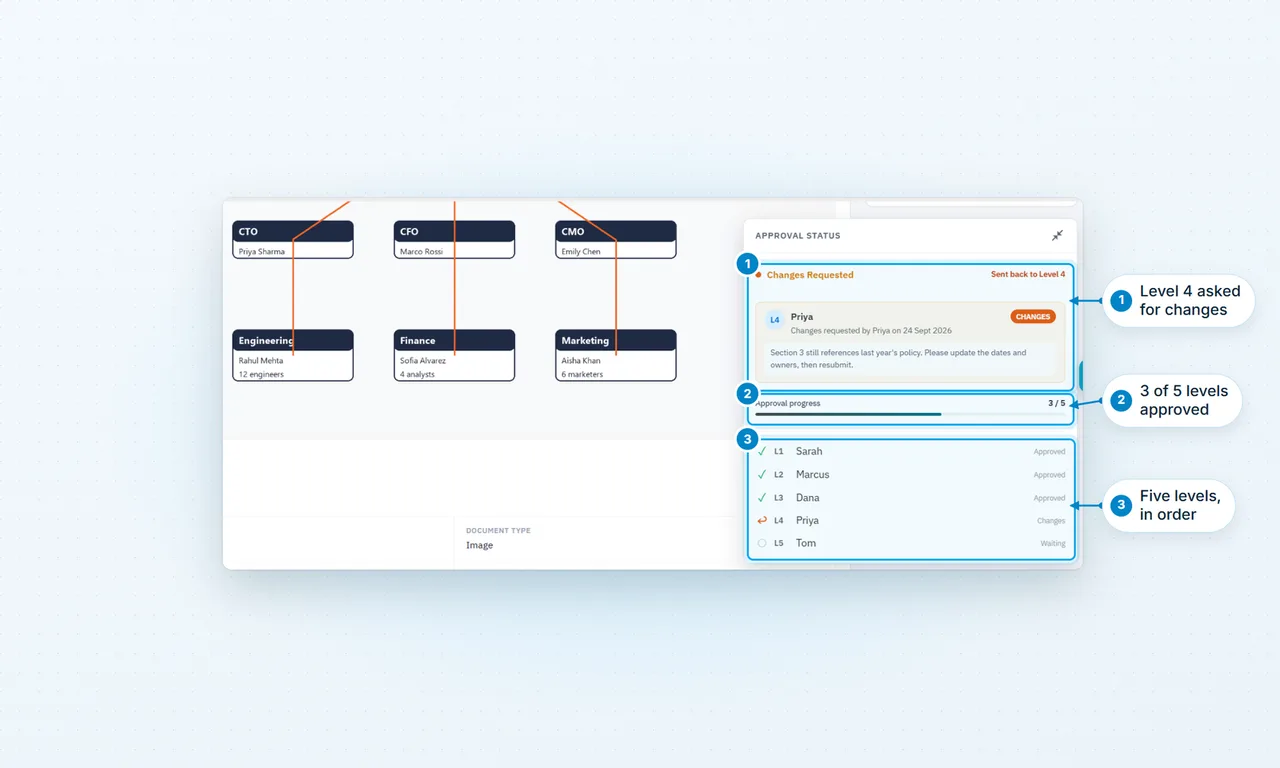
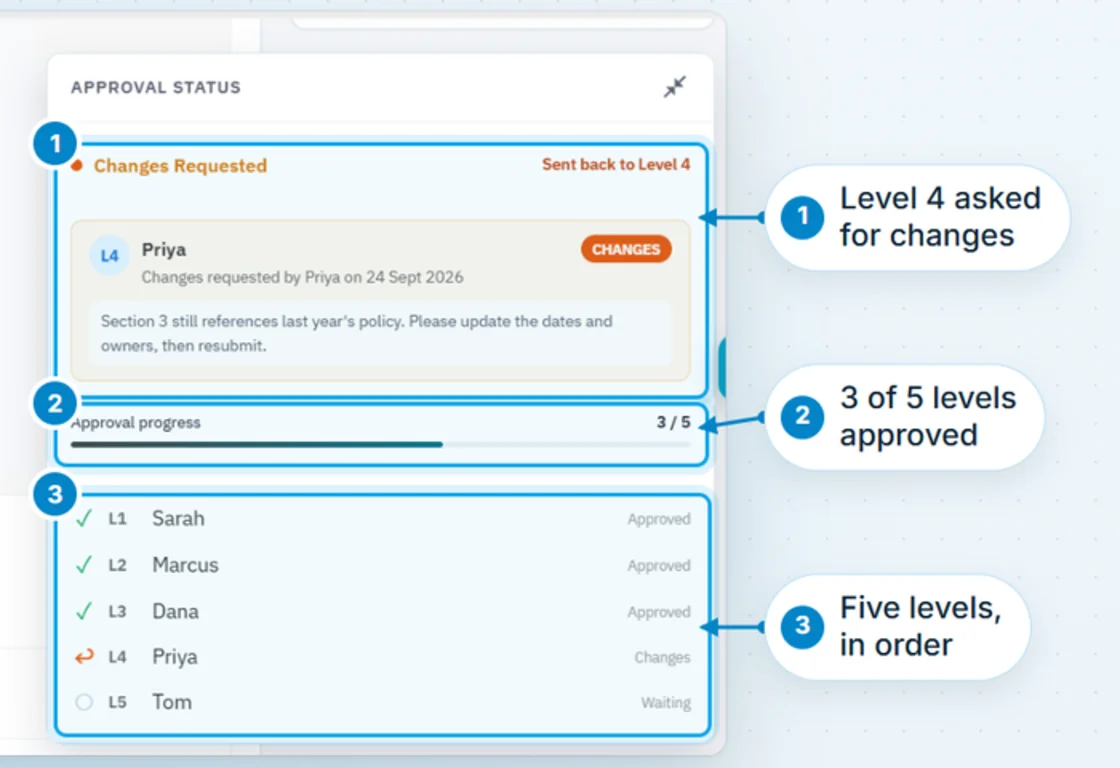
The approval chain
Five levels in order, three approved, level four asking for changes.
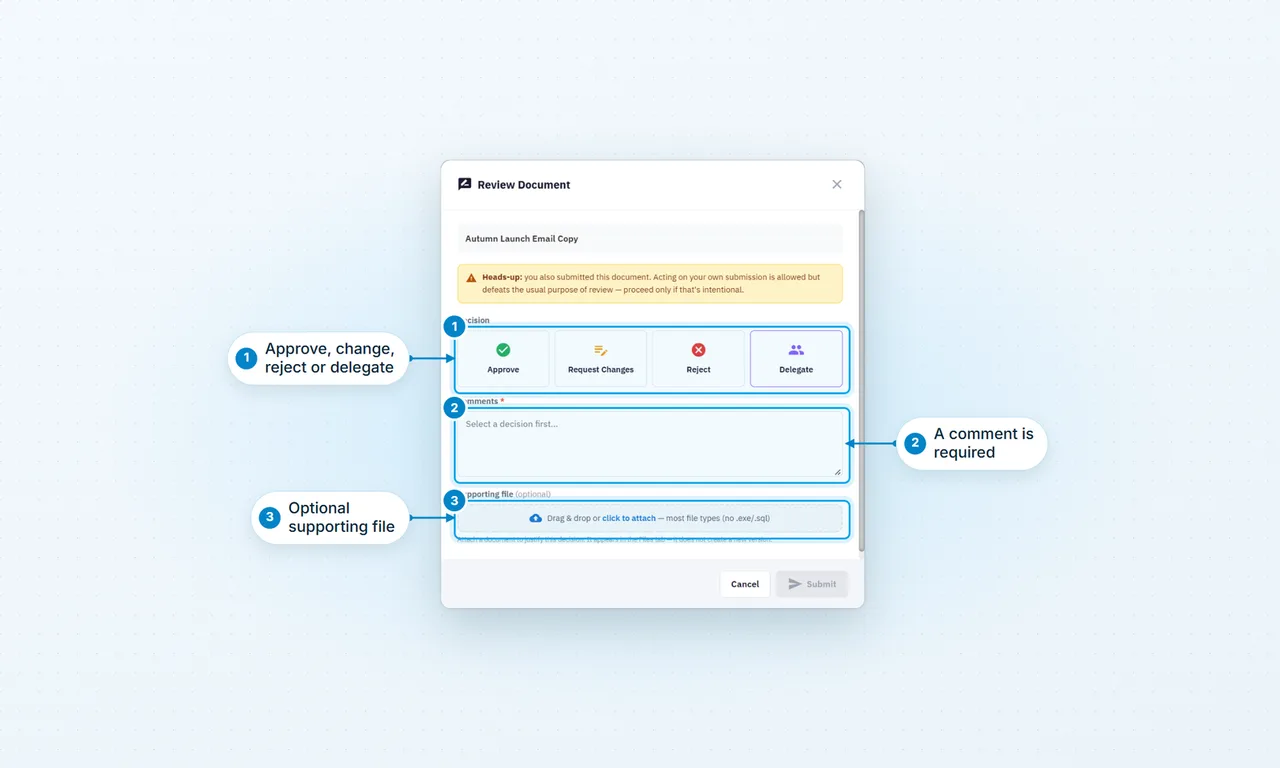
The approver's view
Read, comment, and decide from one screen.
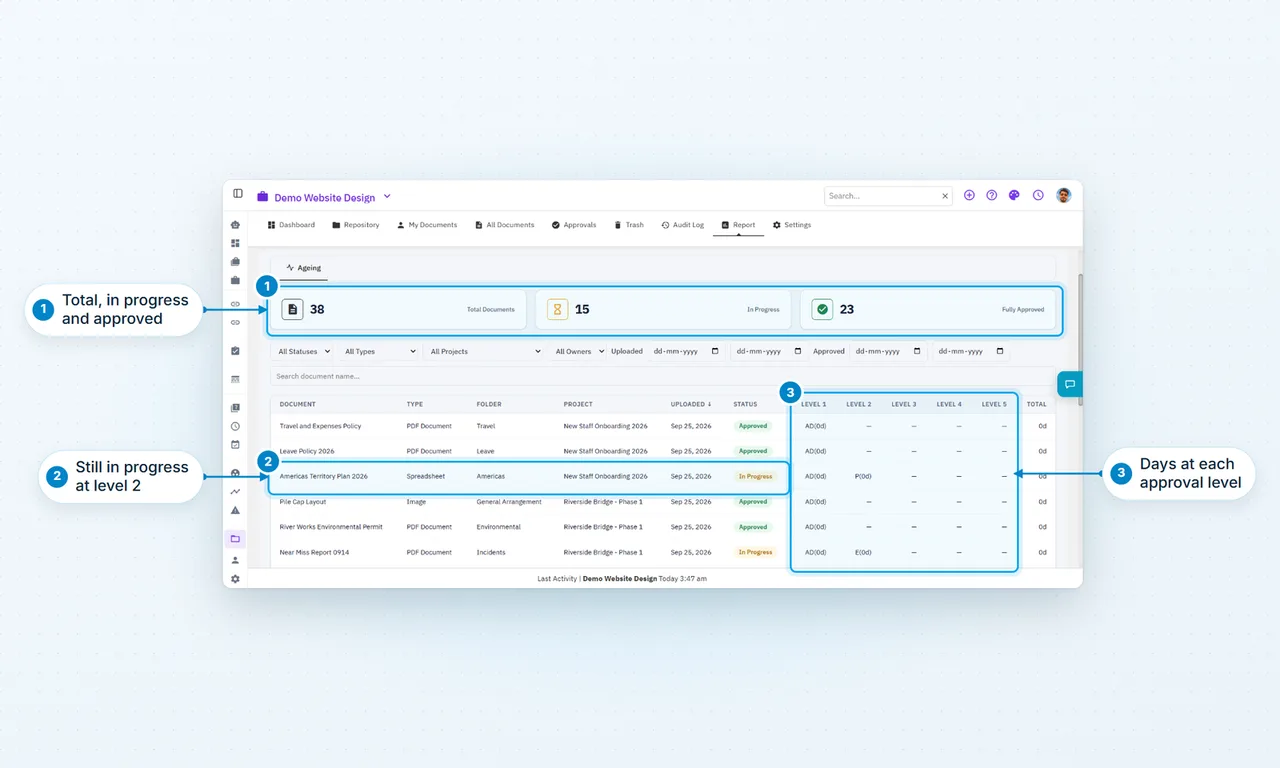
Where documents wait
Days at each approval level, per document.
Which edition includes what
The approval workflow is part of Document Management, an add-on for Cloud and Self-Hosted that is included in the free trial. Cloud: $3 per concurrent user a month on Pro Unlimited, Premium or Enterprise. Self-Hosted: $499 a year per company.
| Capability | Cloud | Self-Hosted | Open Source |
|---|---|---|---|
| Ordered multi-level approval chains | Yes | Yes | No |
| Approver by person, several people, or role | Yes | Yes | No |
| Change requests that resume | Yes | Yes | No |
| Reminder and final overdue notice | Yes | Yes | No |
| Delegation | Yes | Yes | No |
| Automatic approval after set days | Yes | Yes | No |
| Reusable approval templates | Yes | Yes | No |
| Bulk approval | Yes | Yes | No |
| Ageing report and audit log | Yes | Yes | No |
When it is not the right fit
Built for project documents
Orangescrum's approval workflow is built for the documents your projects produce, inside project work, with the document linked to its task.
When another platform fits better
If you need company-wide document and approval handling inside a platform you already run, such as an intranet or records system, that platform may fit better.
Orangescrum vs SharePoint →Approval workflows, answered
Short answers first. Each answer is written to be quoted on its own.
What is an approval workflow for documents?
A defined route a document follows to be approved: who reviews it, in what order, what happens when someone asks for changes, and a record of each decision.
How many approval levels can I have?
As many as you need. Levels run in order, and each level can name one person, several named people where any one of them can approve, or a role.
Can several people share one approval level?
Yes. Name several people on a level and any one of them can approve it, so one absence does not stop the document.
What happens when a reviewer asks for changes?
The reviewer sends the document back to its author or to an earlier level. When it is resubmitted, approval resumes from there, and the levels already approved carry forward.
What if an approver is away?
Delegate the approval to someone else. Approvers also get a reminder, then a final overdue notice that can go to the next approver or the document owner.
How do approvers find what is waiting for them?
On the Approvals page, which lists documents waiting for them, delegated to them and approved today, and by email.
Is it included in the free trial?
Yes. After the trial, Document Management is an add-on: $3 per concurrent user a month in Cloud, on Pro Unlimited, Premium or Enterprise, and $499 a year per company in Self-Hosted.
See the approval chain in your own project
Document Management, including the approval workflow, is included in the free trial.
Included in the free trial · Cloud: $3 per concurrent user a month · Self-Hosted: $499 a year per company
Keep reading
Document Management
The full feature: repository, versions, approvals, ageing report and audit log
Build a reusable approval template
Tutorial: levels, approvers, reminders and delegation
In-house PMOs
One approval route for every project document
Reviewers and approvers
Read, comment, decide and delegate
The business case
Price your own approval delays against the add-on