
One approval route for every project document
Give every project manager the same approval templates, see where documents wait, and keep a record of each decision. Governance without chasing.
Included in the free trial · Cloud: $3 per concurrent user a month on Pro and up · Self-Hosted: $499 a year per company
CloudSelf-HostedOpen Source
| Reader | PMO lead or programme manager |
|---|---|
| Documents | Charters, plans, status and closure reports |
| Route | Shared approval templates |
| Runs in | Cloud and Self-Hosted |
Why PMOs lose sight of documents
| Problem today | With Orangescrum |
|---|---|
| Every project manager approves documents their own way. The same charter goes to three people on one project and one on the next. | Save a chain as an approval template and have every project use it. |
| The PMO cannot see where a document is waiting. The first sign of a stuck document is a late project. | The ageing report shows time at each approval stage. |
| Sponsor approvals stall and nobody notices. A sponsor on leave holds up a whole programme. | A reminder chases the approver, then a final overdue notice can escalate. Delegate when a sponsor is away. |
| Two versions of a charter circulate. People plan against a draft that was replaced last week. | One document in the project folder, with every version and change note kept. |
| A review asks who approved what. The answer is spread across inboxes. | The audit log records approvals, rejections and delegations with the user and time. |
How a project document gets approved
An example with three approval levels. Set your own levels for each kind of document.
01
Pick the template
The project manager uploads the document and selects the approval template the PMO set up for that kind of document.
Features: Approval templates
02
PMO review
The PMO lead reviews, comments and approves or requests changes.
Features: Comments and change requests
03
Sponsor approval
The sponsor approves the version. A template can approve a level automatically after a set number of days, which suits low-risk documents only.
Features: Reminders and delegation
04
Read the waiting time
The PMO reads the ageing report to see where documents wait.
Features: Ageing report and audit log
What a PMO uses
Approval templates
Save a chain once and let every project manager pick it when they submit.
Approvers by person or role
Name a role so the route survives staff changes. Any one holder of the role can act.
Ageing report
See how long each document has spent at each approval stage, and count working days when the working calendar is on.
Reminders and delegation
A reminder chases the approver, then a final overdue notice can go to the next approver or the owner. Delegate an approval when someone is away.
Audit log
Uploads, views, downloads, versions, approvals, rejections and delegations, with the user and time.
Permissions by role
Control what each role can do with documents.
Product screens from a demo project
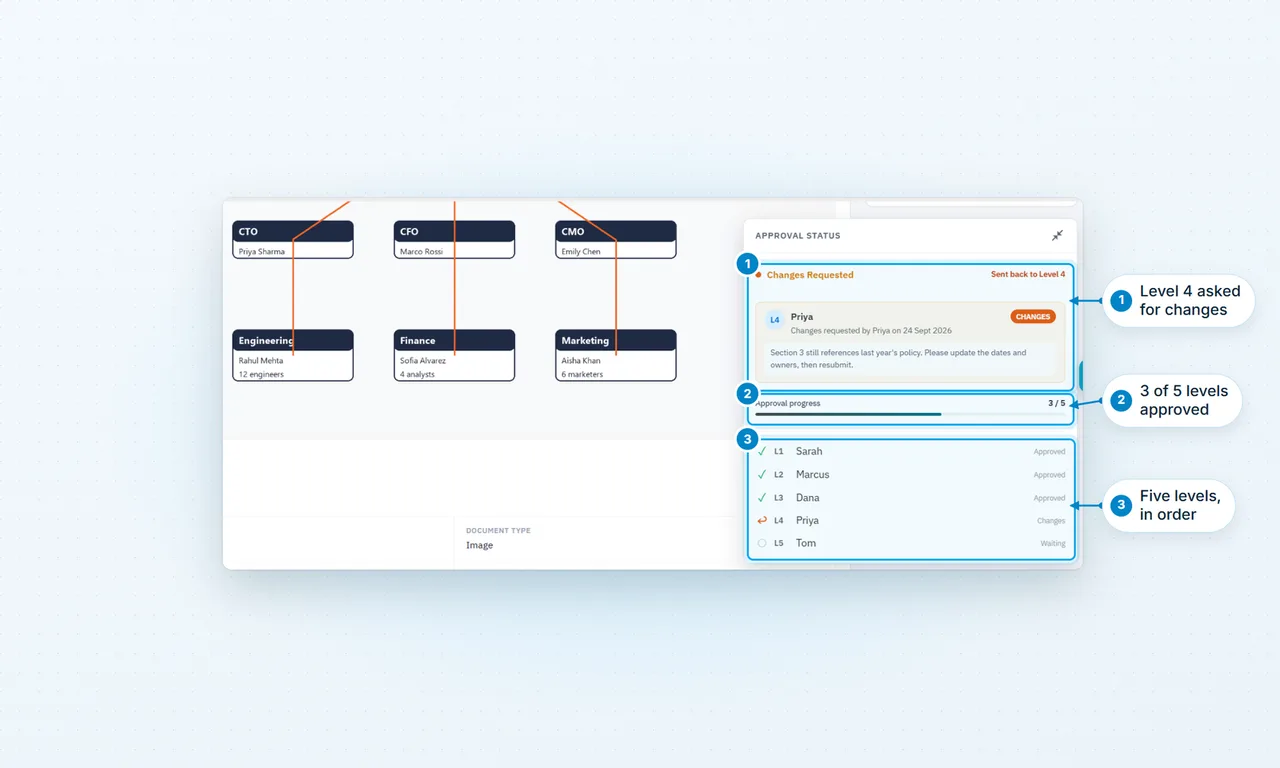
Approval chain
Each level in order, who acted, and where a change request sent the document.
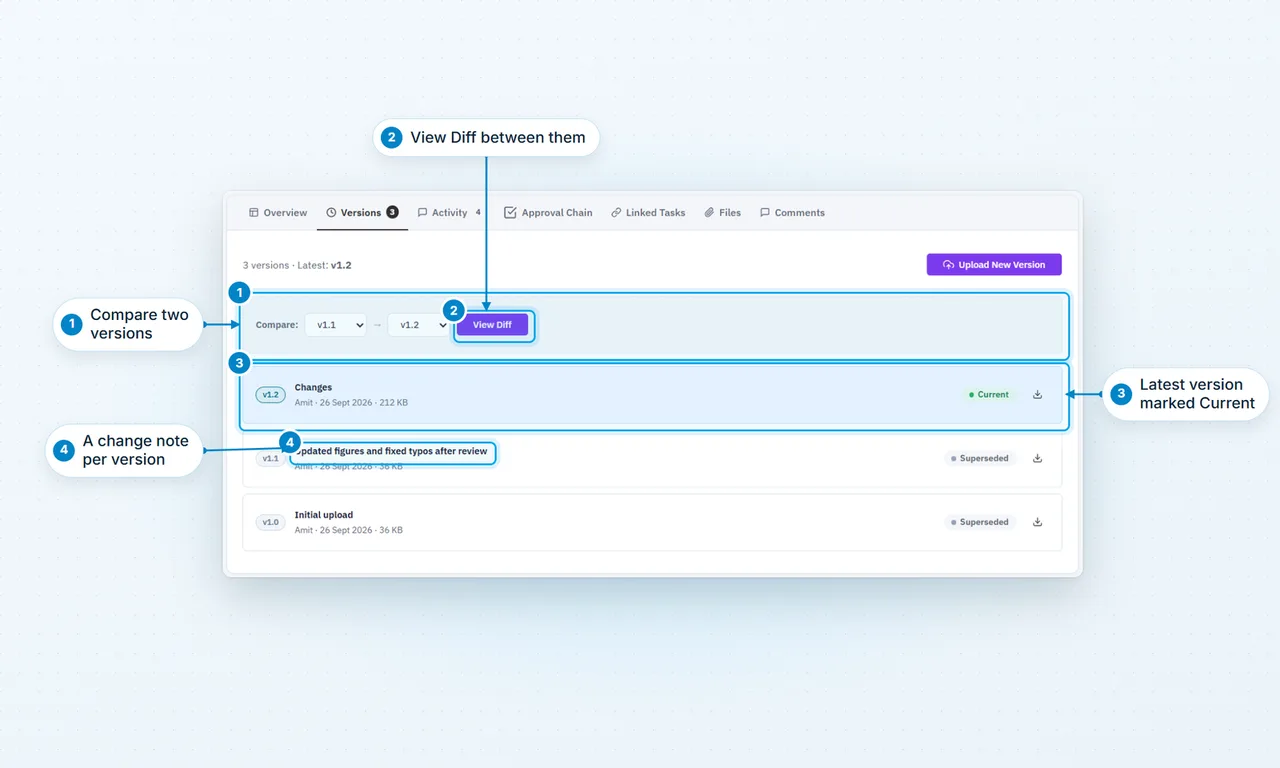
Version history
A change note on every version, and a line-by-line comparison of any two.
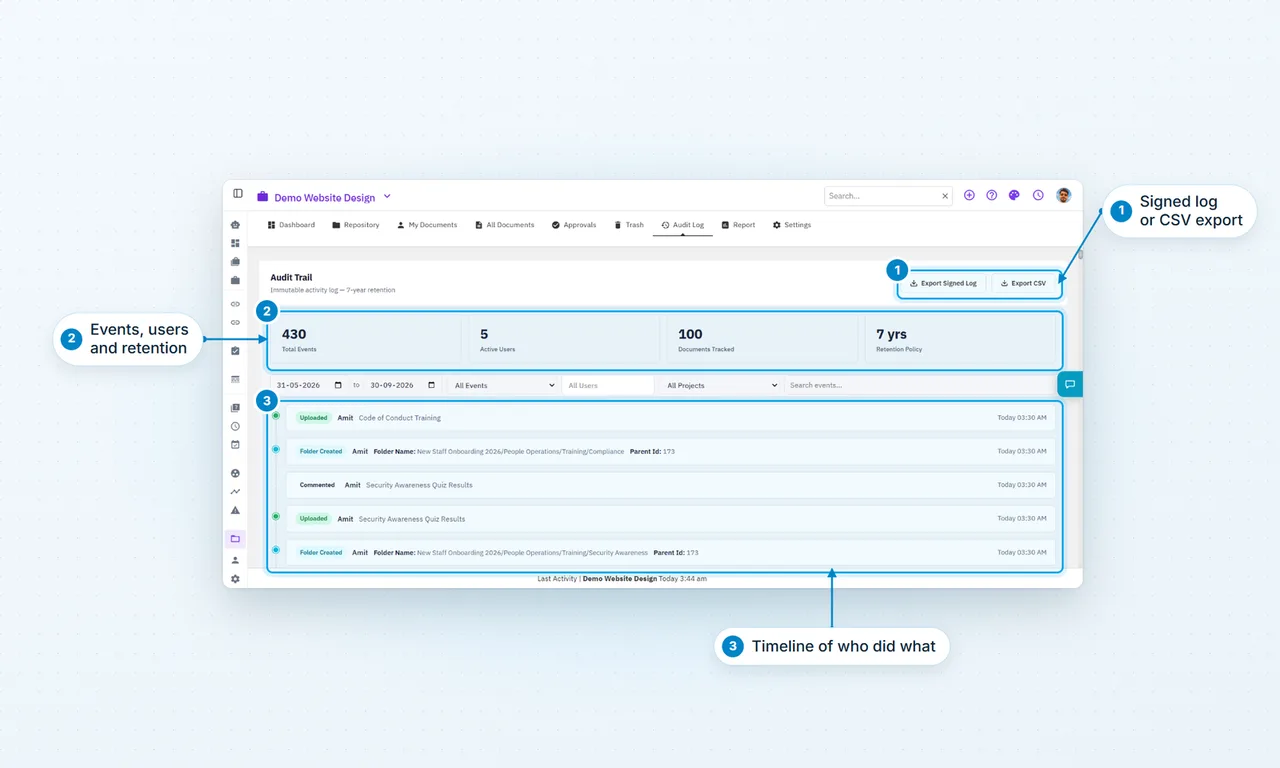
Audit log
Who did what and when, exported as CSV or a signed log.
PMO approvals, answered
Can we use one approval route for every project?
Yes. Save a chain as an approval template, and project managers pick it when they submit a document.
Can the PMO see where documents are stuck?
Yes. The ageing report shows how long a document has spent at each approval stage, and can count working days when the working calendar is on.
What if an approver is away?
Delegate the approval to someone else. A reminder chases a late approver, then a final overdue notice can go to the next approver or the document owner.
Can we prove who approved a charter?
Each upload is a version with a change note, and the audit log records approvals, rejections and delegations with the user and time.
Does the PMO need a separate tool?
No. Document Management is part of Orangescrum, next to your tasks and projects.
Is it included in the free trial?
Yes. Document Management is included in the 14-day free trial. After the trial it is an add-on: $3 per concurrent user a month in Cloud, on Pro Unlimited, Premium or Enterprise, or $499 a year per company in Self-Hosted.
Give every project the same approval route
Document Management is included in the free trial. Cloud: $3 per concurrent user a month on Pro and up. Self-Hosted: $499 a year per company.
Included in the free trial · Cloud: $3 per concurrent user a month on Pro and up · Self-Hosted: $499 a year per company
Keep reading
Document Management
The full feature: repository, versions, approvals, ageing report and audit log.
Project managers
See where each document waits.
Business case
Price your own approval delays and compare them with the add-on cost.
Approval workflow software
Ordered approval levels with a record of every decision.