
Set up document control once, then keep it tidy
Create the folders, roles and approval templates your teams need, and keep the audit log within reach. Works in Cloud and Self-Hosted.
Included in the free trial · Cloud: $3 per concurrent user a month on Pro and up · Self-Hosted: $499 a year per company
CloudSelf-HostedOpen Source
| Reader | Admin or IT owner |
|---|---|
| Set once | Folders, roles, sharing, approval templates |
| Permissions | 22 document permissions, set by role |
| Runs in | Cloud and Self-Hosted |
Why document setup gets messy
| Problem today | With Orangescrum |
|---|---|
| Every team has its own folder layout. Nobody can find a document in a project they did not set up. | Nested folders inside each project, with a structure you set. |
| Access is hard to control. Contractors see more than they should, or staff see too little. | Permissions by role, plus a sharing level for each document. A role can be limited to the documents it uploaded or must approve. |
| Approval chains are rebuilt each time. The same chain is typed in by hand, slightly differently, on every project. | Save a chain as an approval template and reuse it. |
| Staff changes break approval routes. A route names someone who left last month. | Name a role as an approver so the route survives changes. Inactive approvers are skipped. |
| You are asked for evidence. Someone has to rebuild the history from email. | Export the audit log as CSV or as a tamper-evident signed export. |
How an admin sets it up
Four steps, done once and adjusted as teams change. Self-Hosted adds a storage choice: the server disk or S3-compatible storage you control.
01
Plan the folders
Create a folder structure for each type of project. Every project also gets a folder tree built from its sprints and tasks.
Features: Nested folders
02
Set roles and sharing
Set what each role can do, and the sharing level for documents.
Features: Permissions by role, Sharing levels
03
Build templates
Save approval chains as templates for each kind of document, so teams pick the right one when they submit.
Features: Approval templates
What an admin uses
Nested folders
Organise documents in folders inside each project, with a structure you set.
Permissions by role
22 document permissions. Control what each role can do with documents.
Approval templates
Save a chain once, and teams pick it when they submit.
Approvers by person or role
Name a role so the route survives staff changes. Any one holder of the role can act.
Per-document sharing
Share with named people as Can edit, Can view or Can't download, and keep drafts private with Only me.
Audit log
Uploads, views, downloads, versions, approvals, rejections and delegations, with the user and time.
Product screens from a demo project
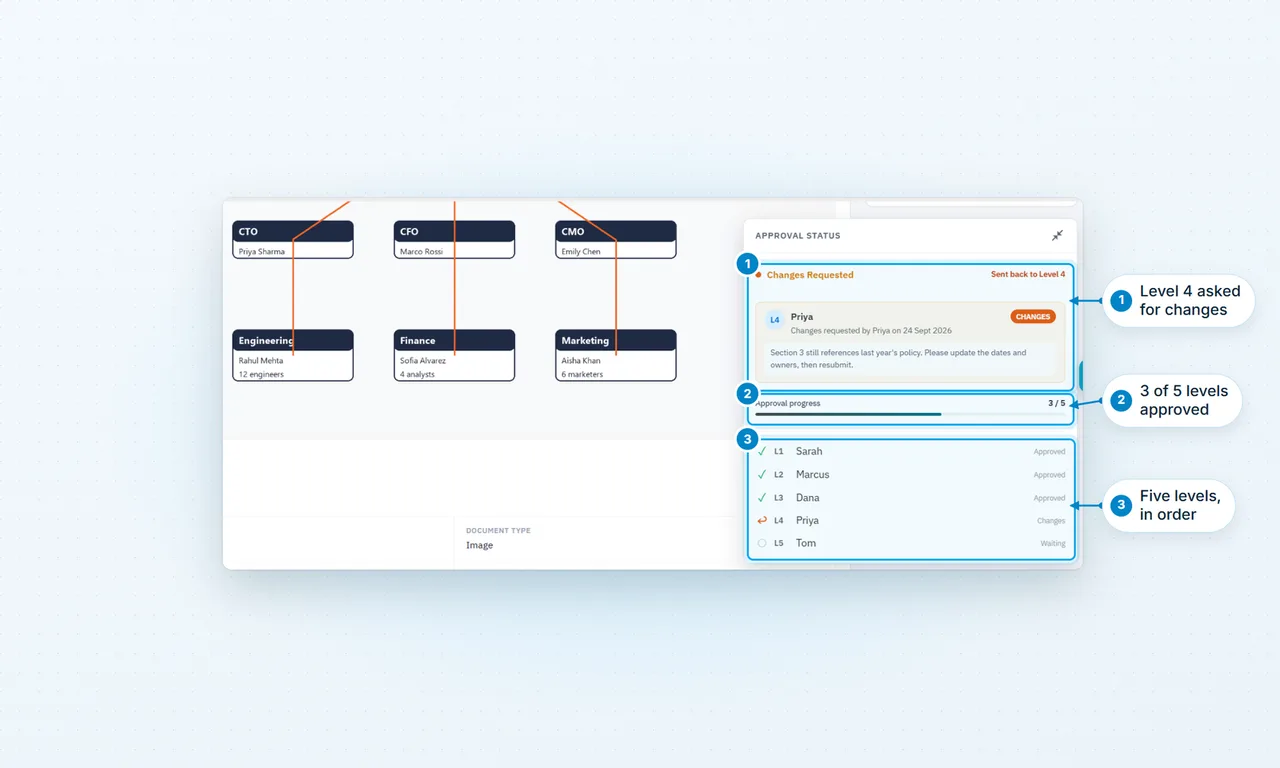
Approval chain
Each level in order, who acted, and where a change request sent the document.
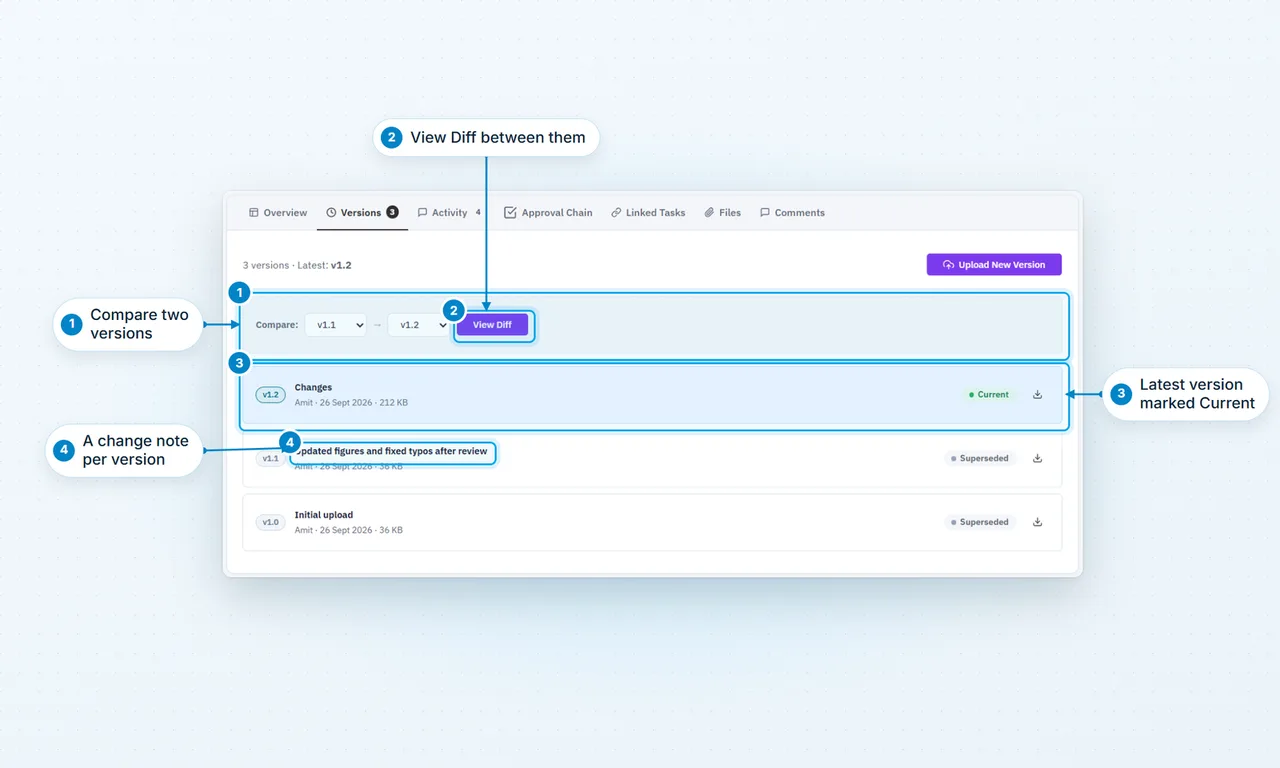
Version history
A change note on every version, and a line-by-line comparison of any two.
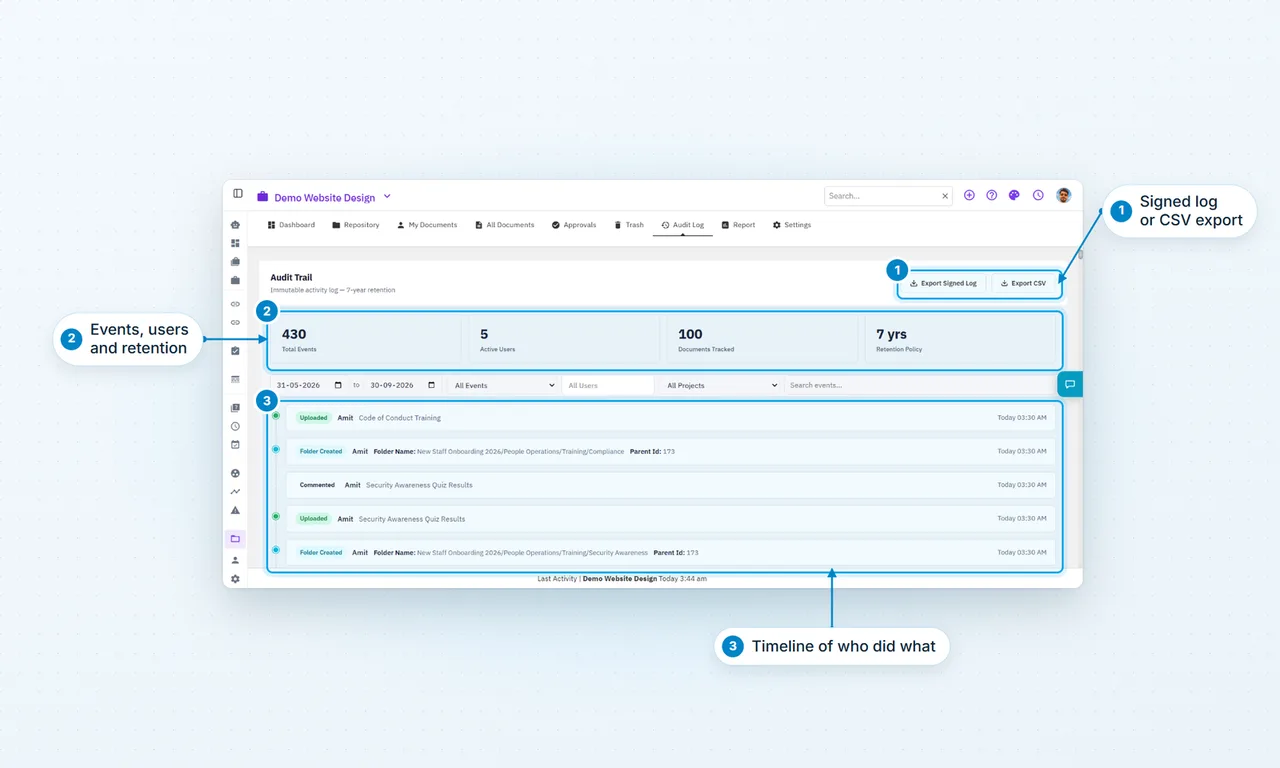
Audit log
Who did what and when, exported as CSV or a signed log.
For admins, answered
Does it work in Cloud and Self-Hosted?
Yes. Document Management is available in both.
Where are files stored in Self-Hosted?
On the server disk or in S3-compatible storage you control. In Cloud, storage is managed by Orangescrum.
Can an approval level name several people?
Yes. Name one person, several people or a role. Any one of them can act.
Can I control what each role can do?
Yes. There are 22 document permissions, set by role, and a role can be limited to the documents it uploaded or must approve.
What does Self-Hosted need?
See the Self-Hosted page for the current system requirements and plans.
Is it included in the free trial?
Yes. Document Management is included in the 14-day free trial. After the trial it is an add-on: $3 per concurrent user a month in Cloud, on Pro Unlimited, Premium or Enterprise, or $499 a year per company in Self-Hosted.
Set it up once and let teams get on with it
Document Management is included in the free trial. Cloud: $3 per concurrent user a month on Pro and up. Self-Hosted: $499 a year per company.
Included in the free trial · Cloud: $3 per concurrent user a month on Pro and up · Self-Hosted: $499 a year per company