
Revise a procedure and show what changed
Upload the new version with a change note, compare it with the last approved one, and send it back through approval. The record shows what changed and who approved it.
Included in the free trial · Cloud: $3 per concurrent user a month on Pro and up · Self-Hosted: $499 a year per company
CloudSelf-HostedOpen Source
| Reader | Owner of procedures, SOPs and standards |
|---|---|
| Each version keeps | A change note and a patch, minor or major label |
| Compare | Any two versions, line by line |
| Runs in | Cloud and Self-Hosted |
Why revisions go wrong
| Problem today | With Orangescrum |
|---|---|
| A new draft replaces the old one with no record. Nobody can say what the procedure said last quarter. | Every upload creates a version with its own change note. |
| Reviewers re-read the whole document. A two-line change costs a full review. | Compare any two versions line by line. |
| Staff use a superseded copy. An old PDF keeps circulating long after it was replaced. | Share the approved version from the project folder. |
| A revision skips review because it looks minor. Small changes add up to a procedure nobody approved. | Send it through the same approval chain as the original. |
| Nobody can show the revision history later. An auditor asks, and the answer is a guess. | Version history and the audit log keep the record. |
How a revision goes back through approval
An example with four steps. Reviewers read the change note first, then the comparison, so they review only what changed.
01
Upload the revision
Add the new version with a change note that says what changed and why. The previous version is kept.
Features: Version history and change notes
03
Re-approve
Send it through the approval chain. If a reviewer asks for changes, approval resumes where it stopped once you resubmit, or from the earlier level the reviewer picked.
Features: Change requests, Ordered levels
04
Share the current version
Share the approved version with the people who need it. Older versions stay in the history.
Features: Per-document sharing and audit log
What a document owner uses
Version history and comparison
Every upload creates a version with its own change note. Compare any two versions line by line.
Change requests and resume
Approval resumes where it stopped, or from the earlier level the reviewer picked.
Ordered multi-level chains
Each level must approve before the next one starts. A chain can have as many levels as you need.
Per-document sharing
Share with named people as Can edit, Can view or Can't download, and keep drafts private with Only me.
Audit log
Uploads, views, downloads, versions, approvals, rejections and delegations, with the user and time.
Comments with mentions
Discuss changes on the document itself, and mention the person who must act.
Product screens from a demo project
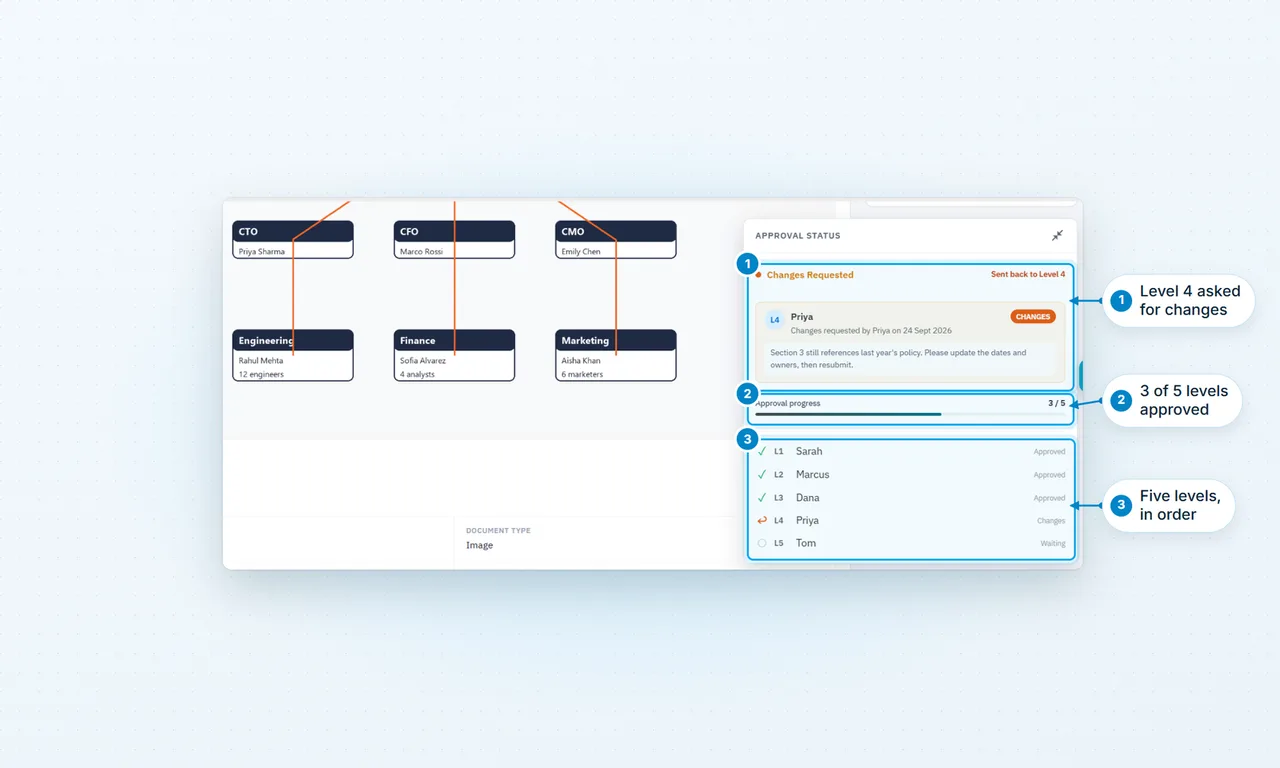
Approval chain
Each level in order, who acted, and where a change request sent the document.
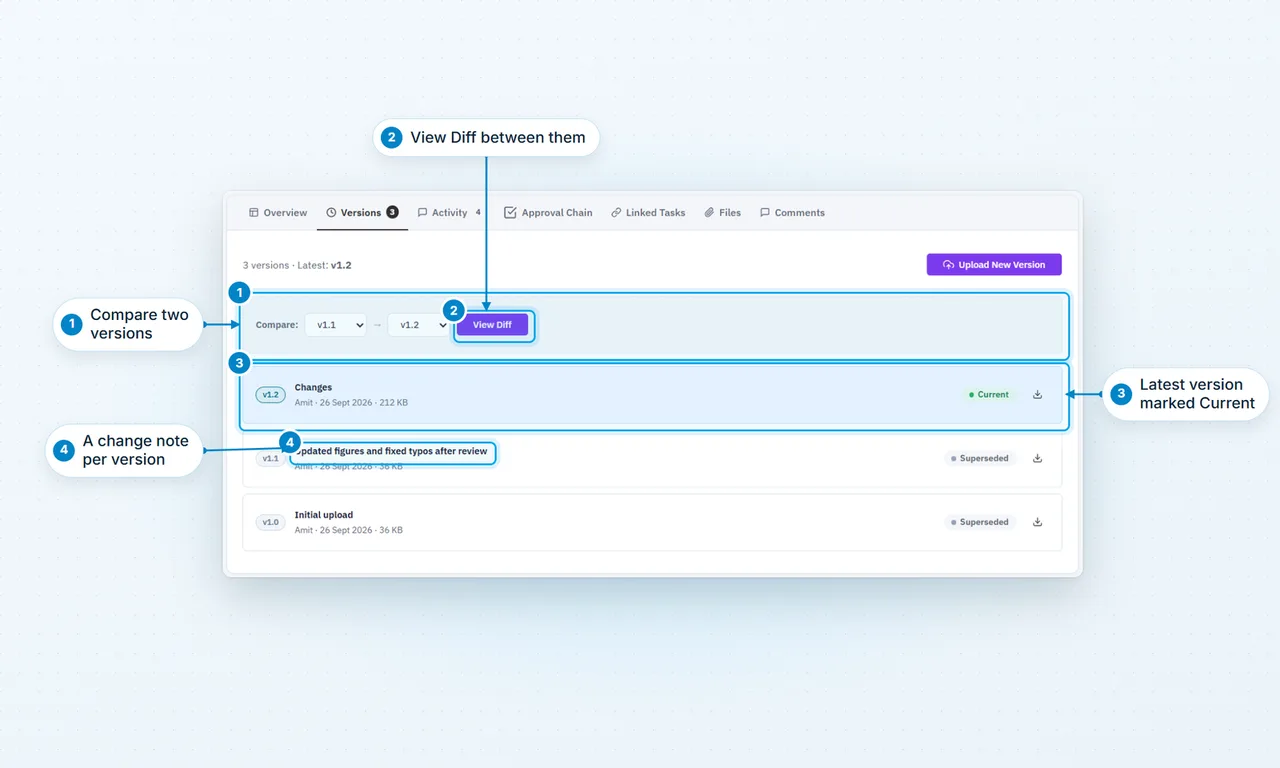
Version history
A change note on every version, and a line-by-line comparison of any two.
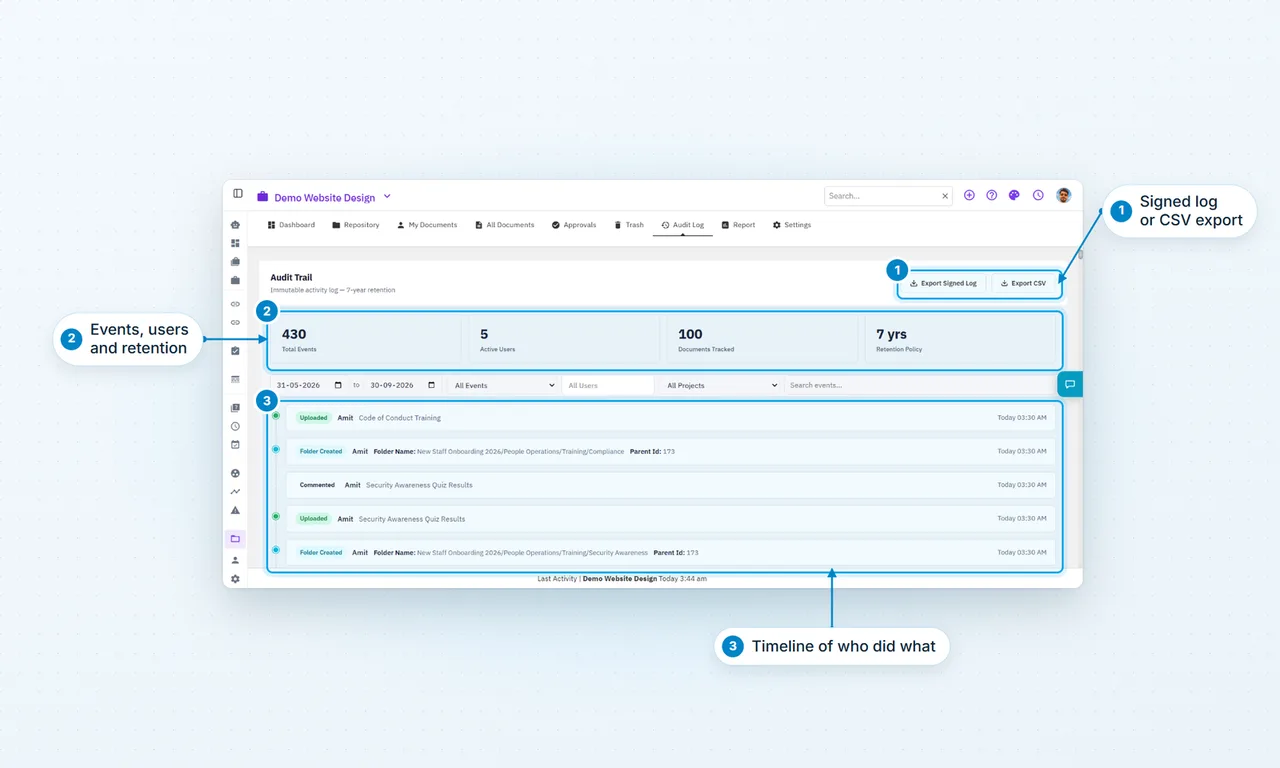
Audit log
Who did what and when, exported as CSV or a signed log.
Document revision, answered
What is a change note?
A short note stored with each version that says what changed. It is required on every new version.
Can I compare two versions?
Yes. Compare any two versions line by line.
Does a revision need approval again?
You send it through an approval chain, the same as the original.
What happens when a reviewer asks for changes?
The document comes back for an update. When it is resubmitted, approval resumes where it stopped, or from the earlier level the reviewer picked.
Can I see who approved which version?
Yes. Each upload creates a version with its own change note, and the audit log records approvals, rejections and delegations with the user and time.
Is it included in the free trial?
Yes. Document Management is included in the 14-day free trial. After the trial it is an add-on: $3 per concurrent user a month in Cloud, on Pro Unlimited, Premium or Enterprise, or $499 a year per company in Self-Hosted.
Make every revision visible
Document Management is included in the free trial. Cloud: $3 per concurrent user a month on Pro and up. Self-Hosted: $499 a year per company.
Included in the free trial · Cloud: $3 per concurrent user a month on Pro and up · Self-Hosted: $499 a year per company