
Technical documents reviewed before the client sees them
Route solution designs, runbooks and change plans through the right technical reviewers, then share the approved version with the client. One document, one version in force.
Included in the free trial · Cloud: $3 per concurrent user a month on Pro and up · Self-Hosted: $499 a year per company
CloudSelf-HostedOpen Source
| Reader | Delivery manager or engineering lead |
|---|---|
| Documents | Solution designs, runbooks, change plans |
| Review | Ordered levels: tech lead, security, delivery head |
| Runs in | Cloud and Self-Hosted |
Why technical reviews drag on
| Problem today | With Orangescrum |
|---|---|
| Design documents are reviewed in chat, and feedback is lost. The decision lives in a thread nobody can find a month later. | Comments sit on the document itself, with @mentions for the person who must act. |
| Reviewers do not know who goes first. Security signs off on a draft the tech lead was about to change. | Set the order once. Each level approves before the next one starts. |
| The client receives an old version. Someone forwards the draft from their downloads folder. | Share the approved version from the project folder as Can view or Can't download. |
| Reviewing a new draft means re-reading everything. Reviewers cannot see what moved between drafts, so they skim. | Compare any two versions and read each version's change note. |
| Documents for a client must stay on your own infrastructure. A contract or security policy rules out a hosted store. | Run Self-Hosted, with storage on the server disk or in S3-compatible storage you control. |
From draft to approved design
An example with four steps. Name each approval level by person, several people or role.
01
Draft and link
Upload the design to the project folder and link it to the task it belongs to.
Features: Nested folders, Links to tasks
02
Technical review
Send the draft to the tech lead, then security. Name several people at a level when any one of them can approve.
Features: Multi-level approvals
03
Delivery approval
The delivery head approves the version. If changes are requested, approval resumes where it stopped once the author resubmits, or from the earlier level the reviewer picked.
Features: Change requests and version comparison
04
Share with the client
Share the approved version with the client's named people as Can view or Can't download.
Features: Per-document sharing and audit log
What a delivery team uses
Ordered approval levels
Each level approves before the next one starts. A level can name several people, and any one of them can approve.
Approvers by person or role
Name a role so the route survives staff changes. Any one holder of the role can act.
Version history and comparison
Every upload creates a version with its own change note. Compare any two versions line by line.
Comments with mentions
Discuss changes on the document itself, and mention the person who must act.
Per-document sharing
Share with named people as Can edit, Can view or Can't download, and keep drafts private with Only me.
Links to tasks
Open the document from its task, and the task from the document.
Product screens from a demo project
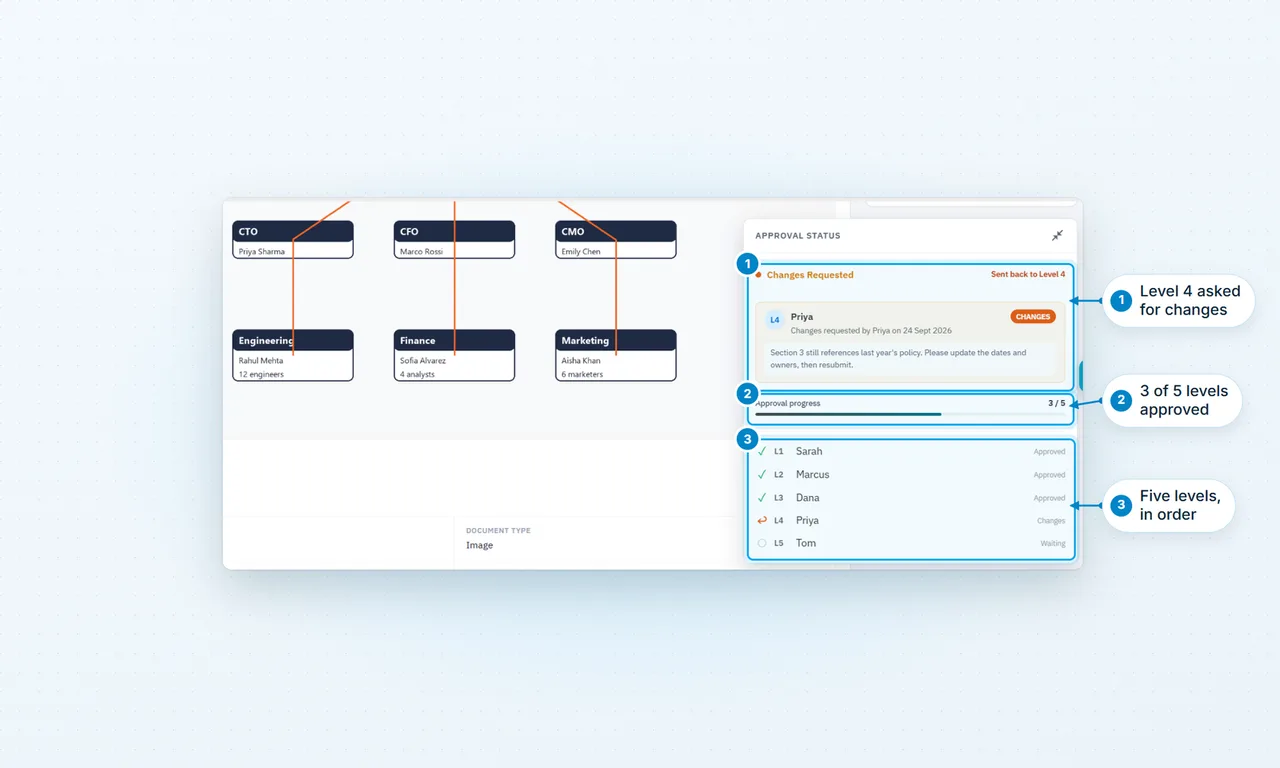
Approval chain
Each level in order, who acted, and where a change request sent the document.
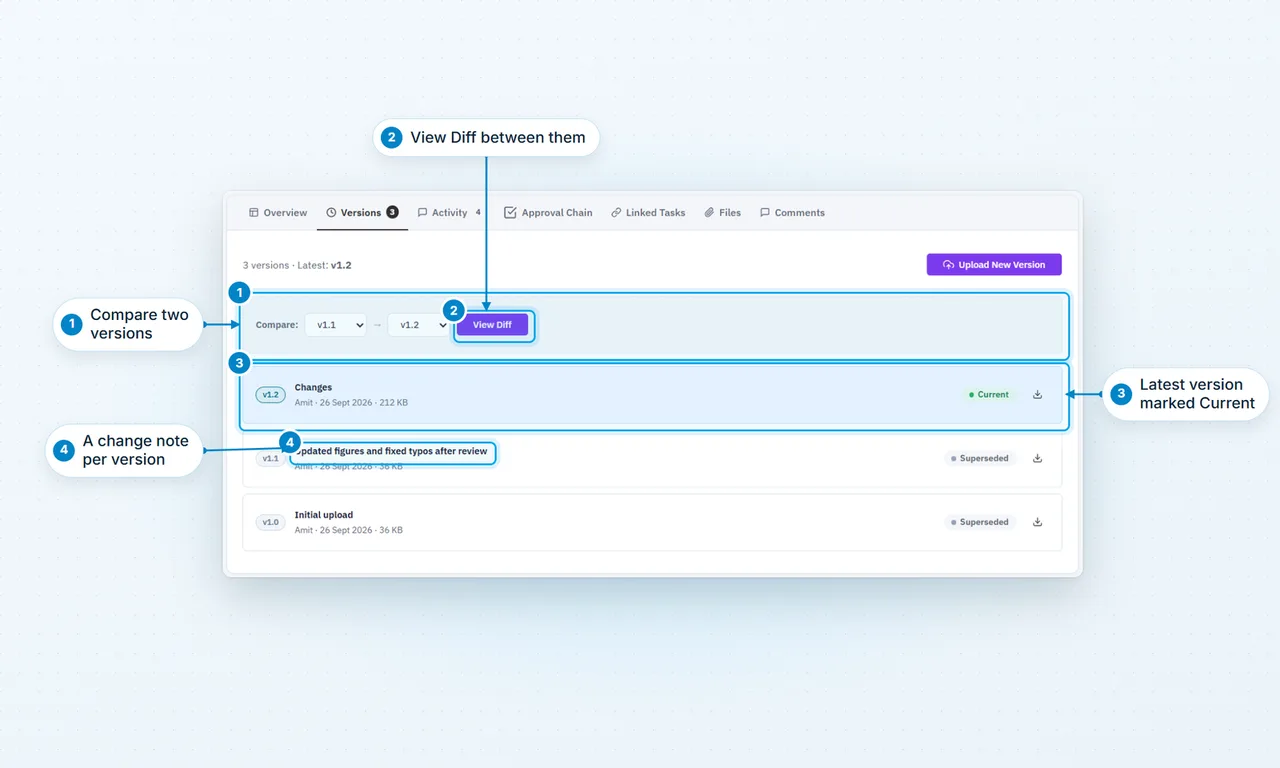
Version history
A change note on every version, and a line-by-line comparison of any two.
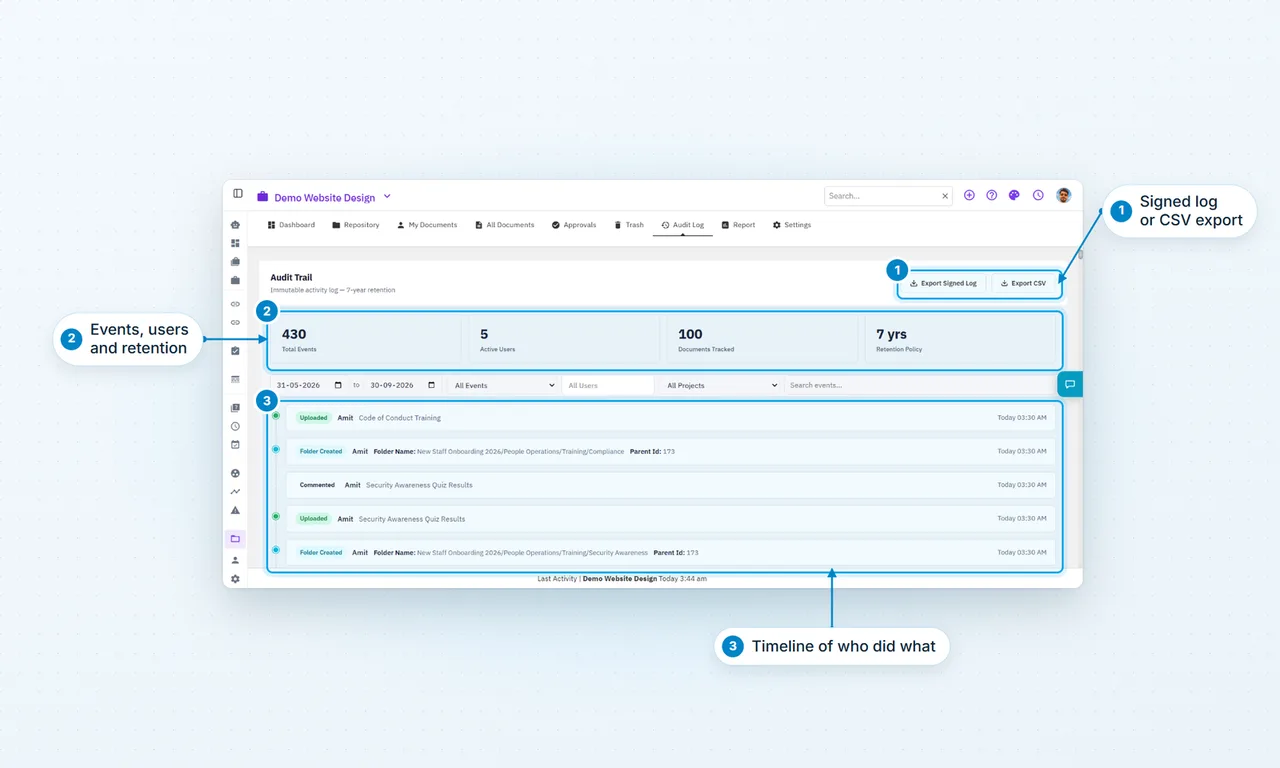
Audit log
Who did what and when, exported as CSV or a signed log.
Technical review, answered
Can several reviewers share one level?
Yes. A level can name several people or a role, and any one of them can approve. Levels run in order, each one after the level before it.
How do we avoid sending an old version?
Share the approved version from the project folder. Each upload is a version with its own change note.
Can the client download the document?
You choose: share it with the client's named people as Can view, or as Can't download so no copy leaves the system.
Can we link the document to the task?
Yes. Open the document from its task, and the task from the document.
Can documents stay on our own servers?
Yes, in Self-Hosted: on the server disk or in S3-compatible storage you control. In Cloud, storage is managed by Orangescrum.
Is it included in the free trial?
Yes. Document Management is included in the 14-day free trial. After the trial it is an add-on: $3 per concurrent user a month in Cloud, on Pro Unlimited, Premium or Enterprise, or $499 a year per company in Self-Hosted.
Get every design reviewed once, in the right order
Document Management is included in the free trial. Cloud: $3 per concurrent user a month on Pro and up. Self-Hosted: $499 a year per company.
Included in the free trial · Cloud: $3 per concurrent user a month on Pro and up · Self-Hosted: $499 a year per company
Keep reading
Document Management
The full feature: repository, versions, approvals, ageing report and audit log.
Approval workflow software
Ordered approval levels with a record of every decision.
Reviewers and approvers
Review a document, decide and move on.
Controlled document revision
Revise an approved document and show what changed.